
Native for real
Your own kernel and the system WebView. No bundled Chromium.
Build your desktop apps with your own tools — and with everything you want.
Available on Linux and Windows
Your own kernel and the system WebView. No bundled Chromium.
The base kernel is around 2 MB. Less weight, faster startup.
A typed SDK in the main process and in the renderer.
Real installers and auto-update with delta, signing and rollback.
Add C++ modules to your app and call them from TypeScript.
Apache-2.0, developed in the open on GitHub.
ow create scaffolds a project with the UI ready, ow dev brings up the kernel + Vite with hot-reload, and ow build produces your binary, your installer or your update channel.
# create + run
$ ow create my-app
✓ project created in ./my-app

$ cd my-app && ow dev
  kernel   owear 0.1.4 (linux/x64)
  vite     ready in 320 ms
  window   http://localhost:5173

# package
$ ow build app
  release/my-app   1.9 MB
✓ done
Owear takes care of the boring parts so you can focus on your app.
Native windows, menus, tray, dialogs and notifications. Control the whole app lifecycle from the main process.
Publish a signed channel and your app updates itself: it downloads only what changed and rolls back if something breaks.
One installer binary with shortcuts, icon and its own uninstaller. No extra toolchains or dependencies.
When JavaScript isn't enough, add C++ to your app (.owm) and call it from the renderer like any other function.
The renderer is standard web: bring your own stack and build.
The same app (same HTML/JS) running on each framework, on Linux with Xvfb and software rendering: warmup + 3 interleaved runs, startup by marker (5 ms) and memory in PSS (proportional, so shared pages aren't counted twice).
Geometric mean across 11 zones. Baseline Electron = 100%; lower is better.
| Owear | Electron | Tauri | Neutralino | |
|---|---|---|---|---|
| Startup (ms) | 1,438 | 1,028 | 1,001 | 958 |
| Idle RAM (MB, PSS) | 105 | 248 | 120 | 129 |
| Peak RAM (MB, PSS) | 334 | 408 | 255 | 308 |
| Size (MB) | 1.8 | 262 | 11.6 | 3.0 |
| Sequential IPC (ops/s) | 1,496 | 3,192 | 1,127 | 23 |
| Concurrent IPC (ops/s) | 4,211 | 10,449 | 2,886 | 876 |
| Payload 1 MB (ms) | 28 | 11.5 | 27 | 111 |
| File 5 MB (MB/s) | 83 | 119 | 93 | 116 |
| Download 5 MB (ms) | 79 | 30 | 68 | 284 |
| Native→render events (ev/s) | 250,000 | 34,990 | 1,371 | 10,438 |
| JS loop 20M (ms) | 27 | 32 | 24 | 24 |
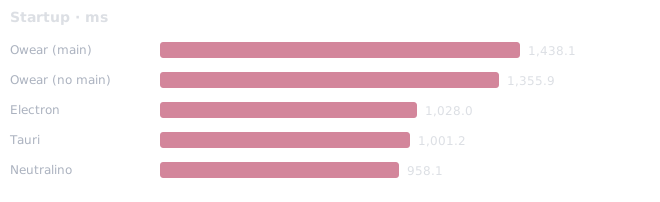
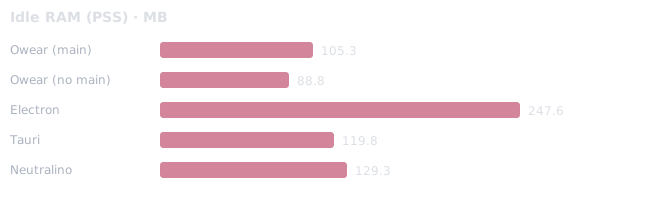
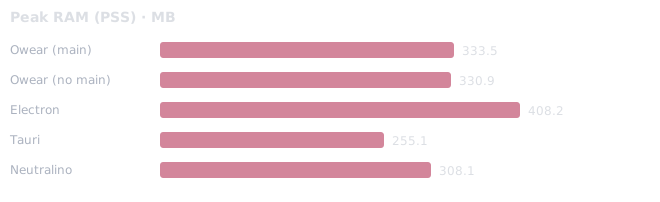
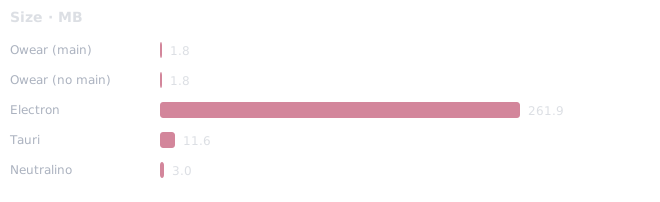
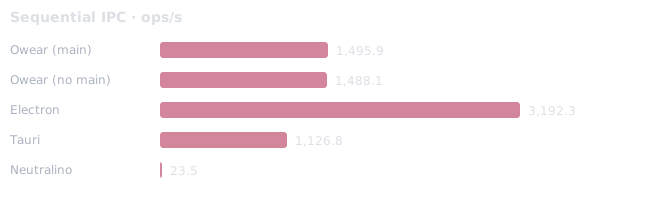
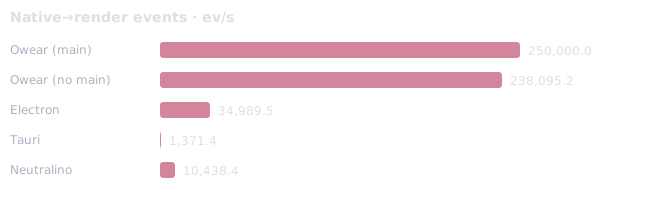
Medians over 3 runs (plus a discarded warmup). Electron bundles Chromium; Owear/Tauri/Neutralino use the system WebView. Neutralino measures its IPC through its own extension. Methodology and caveats: benchmarks/README.md.
$ npm i -g @owear/cli $ ow create my-app $ cd my-app && ow dev $ ow build app Requires: Node ≥ 20 and, on Linux, the WebKitGTK toolchain (see the documentation).
Open source, Apache-2.0. Get started in a minute.